Saturday, March 23, 2013

Ghost Automated Restore Boot CD/DVD part 3

Ghost Automated Restore Boot CD/DVD part 3

Step 1 Select Data disk & OK

Step 2  Disk/Boot Option


Step 3
·         Tick Make disk bootable
·         Find your .ima boot disk
·         Select Floppy 2.88MB
·         OK


Step 4 
  • Drag your CDR00001.gho etc., files down to the lower right pane.
  • Click Burn far left icon.
  • Finished.
  •  
  • Put disk into PC and 20 mins later should be good to go.

Wednesday, July 18, 2012

Ghost Automated Restore Boot CD/DVD part2

Ghost will burn a series of 2gb files to DVD


CDR00001.GHO

CDR00002.GHO
CDR00003.GHO
etc..

Copy those files to somewhere on your PC. 


Now you need to create the boot disk and for that you will need to get WinImage. I use the portable version.

You will also need to get a win98 or XP dos boot disk. If you don't have boot disks you can get them from here.


You will need to edit the autoexec.bat file. Mine looks like this;


@ECHO OFF

PATH=A:\;A:\DOS;A:\GHOST;A:\NET

LOADHIGH MSCDEX.EXE /D:shane /L:T
LOADHIGH MOUSE.COM
GHOST.EXE -CLONE,MODE=LOAD,SRC=T:\CDR00001.GHO,DST=1 -SURE


My config.sys file looks like this;


DEVICE=HIMEM.SYS

BUFFERS=20

FILES=60
DEVICEHIGH=gcdrom.sys /D:shane


You will need to find gcdrom.sys on a search engine as win98 & xp boot disks used oakcdrom.sys (old IDE) for the CD/DVD driver but newer PC's use Sata and for this you need gcdrom.sys


To create a boot disk copy the contents from your a:/ drive (your floppy disk) or the contents from the boot disk you downloaded into WinImage. Make sure you select 2.88MB as all the dos files and the ghost.exe file won't fit onto a standard 1.44MB formatted boot disk. Make sure to include the edited autoecec.bat & config.sys files to WinImage :)


Now edit the Boot sector properties to the following.


Select Windows 95/98 or Win NT/2K/XP. I use 95/98 and never have problems. If you don't do this step and create the boot disk you will find that your PC never boots up and just freezes during dos POST. 

Now that you have your ghost files (cdr00001.gho etc., etc.) and your dos boot disk ready you just need to burn the whole project to DVD.

Part 3 to follow...


Thursday, June 21, 2012

Ghost Automated Restore Boot CD/DVD


Guide on how to create an automated Ghost Restore Boot DVD. Comes in handy when you have a client that knows little to nothing about IT so you can give them a pre-made restore DVD that they just whack into their drive and in 20 mins they have their OS back up with no user input needed.


Setup the target computer how you want, install the OS, Office, Winrar, Drivers etc., keep in mind any OS from Windows 7 and above rarely fits on 1 DVD. Once you have the PC setup how you want it then you need to make a Ghost Image of it.

Reboot the PC with Hirens CD and run ghost. This guide is simple so I won't be showing how to restore a partition but rather a disk restore. If you just want to restore a partition then it's a simple matter of adjusting the Autoexec.bat script. Keep in mind that a disk restore will completely wipe/destroy ALL data on the Hard Drive. I have in the past created auto restore dvd's that restore just the C partition (The OS) and leaves all other partitions alone on the HDD.

When ghost has loaded,


  1. Insert a blank DVD
  2. Local/Disk/To Image.
  3. Select the drive you want to image
  4. Select DVD drive as where you want to save the image to.


This will create an image of your target PC on 1 or more DVD's depending on how much data is on your drive.


Once you have the image on DVD's then you need to goto your work/desktop PC and now create the automated ghost part.

End or part 1...

Wednesday, June 2, 2010

GA-P55 can't install chipset drivers

I bought a GA-P55A-UD3R rev1 mobo and installed Windows 7 64 bit. I installed the latest mobo INF chipset drivers and when I checked device driver versions in device manager nothing had been updated.


All the versions were 6.1.7600.16385 which are default Microsoft drivers from 2006. Nothing i did could get the mobo drivers installed, run as administrator did nothing.

Finally found out thanks to this post how to do it.

CMD into the folder where the setup.exe is and at the cmd prompt type "setup.exe -A" that will extract the inf files to C:\Program Files (x86)\Intel\InfInst\Inf

then type "setup.exe -OVERALL" That will force the overwrite of all the inf drivers. Reboot and you will have up to date mobo drivers.

Windows 7

Some useful information for setting up Windows 7


#1 Want to auto login to MSN hotmail when you click on the MSN mail link but Firefox or your default browser takes you to a sign in page where you have to manually enter the password?


Then you need this tool Hotmail in IE, it will make it so emails will open up in IE but you can keep your default web browser as something else.

#2 Disable autoplay for CD/DVD & USB

1 Click the Start and Input "gpedit.msc" in search box, then click the result to open the gpedit
2 Expand Administrative Templates >Windows Components > Autoplay Policies in order.Then double click "Turn off Autoplay"
3 Click Enabled, and then select All drives so that you can disable Autorun on all drives.Click Ok at last.
4 After restarting your computer, you have done all the needed work to disable Auto Play in Windows 7.

#3 If you want to stop other users/accounts from logging into your PC and only allow yourself access to the PC

Local Security Policy, User Rights, Deny Logon Locally. Explicitly assign the users you don't want to be able to log into the local PC

Thursday, January 28, 2010

EZcool Vimicro Webcam


EZcool 1.3M 500K webcam with LED lighting

If you have lost your driver or can't find a driver to install on Vista or Windows 7 64 bit and you have one of these cheap but good asian webcams, it more than likely is a Vimicro webcam that has been rebadged.

Go to their homepage here and download their Detection Tool direct link to tool.

That tool detected my cam straight up, click on the link that is most suitable to your OS, for me I have win7 64bit, they didn't have those drivers but they had Vista 64 bit drivers and it works great now.

Saturday, November 14, 2009

Hacking & Jailbreaking Iphones

If like me you are having lots of trouble jailbreaking your iPhone then maybe this will help.

Scenario:

A friend gives you their iPhone or a friend of theirs iPhone and asks you to fix it becuase somehow it has become locked and unusable and when you turn it on all you get is the Emergency Phone number screen.
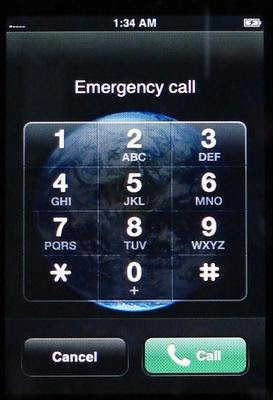


They tell you it happened after iTunes updated their phone.

In my case I have received 2 phones from people to fix.

1) was bought through Optus and was carrier locked, the person never even activated the phone, new straight out of the box and wanted me to unlock it so they could use another sim card. When I received it the only screen I could get was the above emergency screen. Obviously my simcard (another carrier) wouldn't work and I didn't know anyone with an Optus sim to test it with.

2) Another phone I got was from a person who bought it in USA, obviously it was at some point carrier locked to ATT, but it must have been jailbroken as they were using it in Australia and it worked fine until iTunes updated it lol

In both scenarios I received phones that did not work and were locked into the emergency phone number screen. I had no way of knowing what version phones they were, what OS they last had been using (the people who owned them were clueless and would have no idea).

So off I go to Dev Teams site and d/l reds0w & 3.01 ipsw and run through the steps to jailbreak. On a side not - I prefer to use the old dos redsn0w as you can see what's happening.

But anyway, on both phones I always ended up with the same result, redsn0w would do it's job, and it would either hang at the "waiting for reboot..." screen, or if it did install it would reboot back into the emergency phone thing as if nothing had happened, but redsn0w was reporting it worked fine.

I worked out that with the hanging on waiting on reboot part I was using the wrong ipsw, example; the phone from USA was a 2G (I didn't know, how could I? you can't boot into the phone to find out the OS as it is locked to the emergency phone thing). So I d/l the ipsw for 2G and bingo, no more waiting for reboot... hang.

But still on both phones redsn0w would do it's thing, phone reboot and back to the emergency lock. I would run the hack over and over 5-6 times and be stumped. Why wasn't it working?????

Then it dawned on me, if you are using the wrong revision number ipsw to jailbreak then it simple won't work. For example;

Phone A actually has OS 2.2.1 on it, you of course have no way of knowing this as you can't boot the phone up to see what OS is installed.

You d/l ipsw 3.0.1 and are using reds0w to jailbreak. Bam, that is your problem, you are using the ipsw 3.0.1 to try and jailbreak the iPhone 2.2.1 OS. It simply won't work.


You need to match the physical iPhone OS to the ipsw you are using with redsn0w.

So 1st thing you need to do is force iTunes to update your phone to an OS you know.

1)Have iTunes open.
2) Hold down Power (top or Sleep/Wake) and Home buttons for about 10 seconds until phone turns off (screen goes dark) to reboot iPhone.
3) Right after iPhone is off, release the Power (top) button but continue to press and hold the Home button. After about another 10 seconds, iTunes will detect iPhone in restore mode and automatically launch itself to restore firmware to the phone.
4) This will put your iPhone into recovery mode within iTunes. If the above steps didn't work for you then google how to use recover mode in itunes.
5) When iTunes detects you phone and tells you, you need to restore it, hold down the shift key and click on restore.
6) iTunes will then allow you to browse your computer for a ipsw file to restore your iPhone with.
7) locate the 3.0.1 ipsw you d/l from dev team and let iTunes install that OS.
8) When you phone finally reboots you will still be presented with the "Emergency Phone Number" Thing, but guess what? You now know with 100% certainty that your phone has OS 3.0.1 installed on it. You know this becuase you just made iTunes do it.

Now.... Go through the redsn0w steps and use the same 3.0.1 ipsw and BINGO!!! when your phone reboots it is now jail broken. You can use all the phones apps and make calls etc.

If you can't make calls then you need to unlock it as well, google how to do that, it is a simple process of going into Cydia App that the jailbreak process created for you and entering the repo666.ultrasn0w stuff.

Also if you want to install cracked apps, you will also need to go into Cydia and

1) Manage/Sources
2) uptop right side of screen press "Edit"
3) then on top right screen press "Add"
4) http://cydia.hackulo.us and press "Add Source"
5) Press on "Changes" on the bottom of screen
6) Look for a program called "AppSync 3.0" or AppSync 3.1 and install it.
7) Then look for "Installous" and install that too.

If hackulo is down for any reason then you can get Appsync from another repository http://cydia.iphonecake.com

Now goto the iPhone main page and press the App called Installous and install any cracked app you like. I prefer to d/l the apps from This website here to my computer and use iTunes to sync the apps up, but either way works.

If you want to STOP your iphone from ever using your carrier to access the internet due to HIGH charges and always force it to use your free wifi then you need to change the APN in Cellular Data Network...If you are missing Cellular Data Network & you are on Three 3G then goto this page http://andrew.harrison.org/notes/3-carrier-bundle-for-iphone and follow instructions, the command for PC is C:\Program FIles\iTunes\iTunes.exe”/setPreflint carrier-testing 1

Once you have done that go to settings/general/network/Cellular data network/ & in the the "Cellular Data" section change the APN to something else, I just put a few ss at the end, then if I ever need to use Cell network in the future I just go back into it and remove the extra ss's and it will work.


I have jailbroken the new 3GS with the new iboot system with blackra1n, works fine, just a hassle that when ever you reboot iphone you have to have the iphone plugged into computer with blackra1n running to get it to boot up.

Monday, January 12, 2009

Sony Vegas 8


You have Server 2008 x64 and can't for the life of you get Sony Vegas 8.0 to install?

I finally figured out that I needed to turn off DEP or put Sony Vegas 8 into the exclusion list for DEP.

Thursday, September 4, 2008

Reset Server 2008 admin password

If you forget your password for Server 2008 or any server, XP then get this BootCD

Tested on: NT 3.51, NT 4 (all versions and SPs), Windows 2000 (all versions & SPs), Windows XP (all versions, also SP2 and SP3), Windows Server 2003 (all SPs), Vindows Vista 32 and 64 bit, and some say it works on Server 2008 (32 & 64 bit)

It worked for me :)

Sunday, August 10, 2008

Cannot log into administrator profile

Another kooky server 2008 problem. My computer was working fine, I turn comp off for the night and return the next day, turn it on, only to be greeted by "Windows cannot log you on because your profile cannot be loaded. Check that you are connected to the network, and that your network is functioning correctly. "
"Windows cannot load the user's profile but has logged you on with the default profile for the system. " errors.

I reboot and now my desktop has completely changed, what ever changes I make and reboot the changes are gone and I am back to the default new user desktop.

It took me 2 hours of screwing around but I finally got my admin profile working again.

Regedit : HKEY_LOCAL_MACHINE\SOFTWARE\Microsoft\Windows NT\CurrentVersion\ProfileList


The pic above is my correct version, but what had happened is a virus or malware had changed my admin 500 profile into c:\users\temp so every time I logged in I was getting the temp users profile.

So what you need to do is change it in regedit. Just rename 1 to .bak and the good one to 500.

You will work it out :) Or leave me a message if you need help.

Server 2008 64bit as Desktop?

Hmm maybe not such a good idea. It's very clunky with programs, some work, some don't, some work but in a buggy fashion.

M$ Messenger doesn't install on server OS's, that's ok as there is a work-around. So MSN has been working flawlessly for 2 months then all of a sudden I turn on my PC today to this,


WTH!!!! Where did this Data Execution Prevention crashing Messenger come from?

The only way I could get it going again was to run in 2003 compatibility mode.


I have no idea why this happened, its just another strange 2008 issue.

Friday, June 27, 2008

WMP Firefox Plugin for Server OS

Windows Media Player Firefox plugin on Server operating systems

When installing the Windows Media Player Firefox Plugin (Download here) on Windows Server 2008, I received the following error:


Package does not support server operating systems

I extracted wmpfirefoxplugin.exe with Winrar. This archive contains ffplugin.msi. I used Orca edit this msi file. You can get Orca from here If this link ever goes down just google for Orca Editor, you will find it, it's a 2 meg file.

Look for LaunchCondition:


Remove the row MsiNTProductType = 1:


Save the MSI. You can now install the plugin by doubleclicking the msi.

Sunday, June 22, 2008

Missing Audio Options in Vista and Server 2008

If like me you just installed Vista or in my case Server 2008 64 bit (which is Vista) and you use things like CamTasia or any other screen capturing app and find that you can't record media player because the sound isn't working then this may help you.

Check your control Panel / Sound


Right click and select "Show Disabled Devices"


Now disable your Mic device and enable Mixer.

Now when you run CamTasia or your capture app you will get the sound. When you are done you can reverse the process to put things how they were.

Thursday, May 15, 2008

Zalman CNPS58700 LED


I have a E6300 Core 2 DUO 1.8ghz ever since I've had it, it has always run hot. It idles as 57c and with load 65c - 67c that is with the stock heat sink. I overclocked it to 2.4ghz and played a game for 20 mins to put some load on it and it reached 74c so I quickly put it back to 1.8ghz :)

So I bought a Zalman heatsink today. What a nightmare to install. 2 1/2 hours later I boot up and leave it to idle for 5 mins and it idles at 37c woohoo, so I overclock it to 2.4ghz and it idles at 41c so I play the same game for 20 mins and it got to 47c.

So it was well worth the $68 and 2 1/2 hours to install.

Monday, April 28, 2008

Thinstall Forum


Online FREE thinstall forum http://thinstall.mybb3.org/index.php

Wednesday, March 12, 2008

Ghost and Ghost Walker


Just the Ghost, GhostWalker exe's on their own. Useful if all you want is just the exe and not to install the whole suite.


Ghost Walker 2003.793
utility that changes the security ID (SID) for Windows NT, 2000 and XP

Ghost 11.0.1
Similar to Drive Image (with usb/scsi support)

GDisk 1.1.1
Complete replacement for the DOS FDISK utility and more.

Download Here

Wednesday, October 31, 2007

Stuck behind a firewall?

Are you stuck behind a corporate or school firewall that prevents you from getting to sites you want to visit?

Don't want to have to logon with a user name and password to be able to browse, and don't want to leave traces?

Sick of corporate spies or school gestapo agents looking at their logs watching what site you have been to etc?

Well want no more, the reason these fascists can block sites and view logs of the sites you have been to and how long you spend on the internet each day browsing is because they are using a proxy server.

A proxy server is a means of control, I won't go into detail of what proxy servers can do, just do a search and you will find out.

But ironically, your freedom is to use a proxy server.

The proxy server which is FREE and easy to set up is called Proxomitron and you can get it from here, Proxomitron

You install and run this on your home computer.

Then at work/school you go into your browsers proxy settings configuration page and enter your home IP address and the port number you used.

It looks like this,


It is easy enough to set up, but here are the main things to look for,


I use port 22 as nearly all corporate or school systems allow port 22 alone. Port 22 is for SSH. This also gives you the added benefit of connecting to your proxy through using FreeSSHd.

Port 443 might also work.

This works a treat for me.

Saturday, September 15, 2007

Tuesday, September 11, 2007

Thinstall

Thinstall Website

Key Features

* Single EXE runs from network or offline desktop
* Simple to use, package & deploy in minutes
* No infrastructure changes: deploy with existing systems
* Runs exclusively in User-mode, no device drivers
* Application streaming with no client or server required
* Windows Vista ready – instant migration
* Runs on Terminal Server and MetaFrame (32bit & 64bit)
* Isolation of Filesystem & registryeliminates conflicts
* Upgrade applications while they are still running
* Sandboxing protects machines against modifications
* Supports most Windows applications
* Supports Side-by-Side (SxS) DLL deployments
* Plus many more: Click here for full Feature List

This site has lots of pre-made appz.

Friday, August 24, 2007

UnLocker


Ever get that annoying message?

It has many other flavors:

Cannot delete file: Access is denied
There has been a sharing violation.
The source or destination file may be in use.
The file is in use by another program or user.
Make sure the disk is not full or write-protected and that the file is not currently in use

UnLocker is a nifty util that gets around that problem.

Download from this website.
Direct link to file here.